import numpy as np
import matplotlib.pyplot as plt
import matplotlib.patches as mpatches
import math

n = np.linspace(1, 10, 300)

def norm(y):
    return y / y.max()

n_factorial = norm(np.exp(np.array([math.lgamma(x + 1) for x in n])))

BG     = "#0a0a14"
CARD   = "#111827"
BORDER = "#1e90ff"

data = [
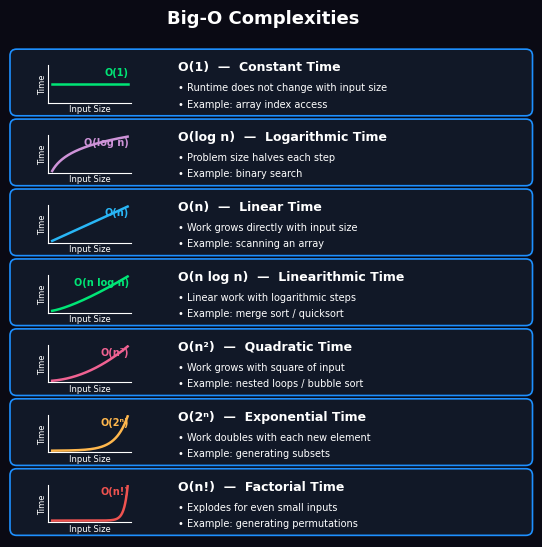
    ("O(1)",       "Constant Time",       norm(np.ones_like(n)),
     "#00e676", ["Runtime does not change with input size", "Example: array index access"]),
    ("O(log n)",   "Logarithmic Time",    norm(np.log2(n)),
     "#ce93d8", ["Problem size halves each step", "Example: binary search"]),
    ("O(n)",       "Linear Time",         norm(n),
     "#29b6f6", ["Work grows directly with input size", "Example: scanning an array"]),
    ("O(n log n)", "Linearithmic Time",   norm(n * np.log2(n)),
     "#00e676", ["Linear work with logarithmic steps", "Example: merge sort / quicksort"]),
    ("O(n²)",      "Quadratic Time",      norm(n ** 2),
     "#f06292", ["Work grows with square of input", "Example: nested loops / bubble sort"]),
    ("O(2ⁿ)",      "Exponential Time",    norm(2.0 ** n),
     "#ffb74d", ["Work doubles with each new element", "Example: generating subsets"]),
    ("O(n!)",      "Factorial Time",      n_factorial,
     "#ef5350", ["Explodes for even small inputs", "Example: generating permutations"]),
]

fig, axes = plt.subplots(
    7, 2, figsize=(5.5, 5.5),
    gridspec_kw={"width_ratios": [1, 2.4], "wspace": 0.0, "hspace": 0.0},
)
fig.patch.set_facecolor(BG)
plt.subplots_adjust(left=0.04, right=0.99, top=0.955, bottom=0.02)

for i, (label, title, y, color, bullets) in enumerate(data):
    ax_bg, ax_t = axes[i]

    # Transparent axes — card bg drawn via figure-level FancyBboxPatch
    for ax in (ax_bg, ax_t):
        ax.set_facecolor("none")
        ax.set_xticks([])
        ax.set_yticks([])
        for spine in ax.spines.values():
            spine.set_visible(False)

    # Inset plot inside the left panel
    ax_p = ax_bg.inset_axes([0.25, 0.21, 0.54, 0.54])
    inset_bg = mpatches.FancyBboxPatch(
        (0.25, 0.21), 0.54, 0.54,
        boxstyle="round,pad=0,rounding_size=0.05",
        linewidth=0, facecolor=CARD,
        transform=ax_bg.transAxes, clip_on=True, zorder=0,
    )
    ax_bg.add_patch(inset_bg)
    ax_p.plot(n, y, color=color, linewidth=1.8)
    ax_p.set_xticks([])
    ax_p.set_yticks([])
    ax_p.set_xlabel("Input Size", fontsize=6, color="white", labelpad=1)
    ax_p.set_ylabel("Time", fontsize=6, color="white", labelpad=1)
    ax_p.set_facecolor(CARD)
    ax_p.spines["top"].set_visible(False)
    ax_p.spines["right"].set_visible(False)
    ax_p.spines["bottom"].set_color("white")
    ax_p.spines["bottom"].set_linewidth(0.8)
    ax_p.spines["left"].set_color("white")
    ax_p.spines["left"].set_linewidth(0.8)
    ax_p.text(0.97, 0.95, label, transform=ax_p.transAxes,
              fontsize=7, color=color, ha="right", va="top", fontweight="bold")

    # Right text panel
    ax_t.text(0.04, 0.82, f"{label}  —  {title}",
              fontsize=9, fontweight="bold", color=color,
              va="top", transform=ax_t.transAxes)
    for j, bullet in enumerate(bullets):
        ax_t.text(0.04, 0.50 - j * 0.23, f"• {bullet}",
                  fontsize=7, va="top", color="white",
                  transform=ax_t.transAxes)

# Draw rounded card borders in figure coordinates (rendered behind axes)
R = 0.012   # rounding radius in figure fraction
GAP = 0.003  # visual gap between adjacent card rows
for i in range(7):
    ax_bg, ax_t = axes[i]
    pos_l = ax_bg.get_position()
    pos_r = ax_t.get_position()
    rect = mpatches.FancyBboxPatch(
        (pos_l.x0, pos_l.y0 + GAP),
        pos_r.x1 - pos_l.x0,
        pos_l.height - 2 * GAP,
        boxstyle=f"round,pad=0,rounding_size={R}",
        linewidth=1.2, edgecolor=BORDER, facecolor=CARD,
        transform=fig.transFigure, clip_on=False, zorder=-1,
    )
    fig.add_artist(rect)

fig.suptitle("Big-O Complexities", fontsize=13,
             fontweight="bold", color="white")
plt.show()

from IPython.display import HTML, display

display(HTML(
    "Source: <a href='https://x.com/algomaster_io/status/2053806932423795081' "
    "target='_blank'>7 must-know Big-O Complexities</a>"
))
# print("Source: <a href='https://x.com/algomaster_io/status/2053806932423795081' target='_blank'>7 must-know Big-O complexities</a>")