

2.3. Built-in Types and Functions#
Python has standard types built into the interpreter. The principal built-in types are: numerics, sequences, mappings, classes, instances, and exceptions. The commonly used data types can be organized as Fig. 2.1.
This chapter builds upon the variables and data types introduced earlier, providing deeper coverage of Python’s type system and advanced operations.
2.3.1. About Types#
Python is dynamically typed, which means you don’t have to declare the data type when creating a variable. The interpreter will figure it out at run time. For example, the x below will receive proper types without user intervention.
x = 10
x = "hello"
x = [1, 2, 3, ]
x[0] = "M S&T"
A kind of value is called a type. Actually, every value has a type – or we sometimes say it “belongs to” a type. Python provides a function called type() that tells you the type of any value.
a = type(1)
b = type(2.0)
c = type(3/2)
d = type('Hello, World!')
e = type('126')       ### note this is a string, not a number

print(a, b, c, d, e, sep='\n')
<class 'int'>
<class 'float'>
<class 'float'>
<class 'str'>
<class 'str'>
type and the built-in function isinstance() work similarly, except isinstance() allows you to check the type you assume and returns True or False.
print(isinstance(1, int))
print(isinstance('126', str))
True
True
2.3.2. Common Built-in Types#
Python has standard types built into the interpreter. The principal built-in types are: numerics, sequences, mappings, classes, instances, and exceptions. The commonly used data types can be organized as table below.
In the Python standard library, they are grouped into 8 categories:
Group |
No. |
Category |
Types |
Remarks |
Sample Use Case |
|---|---|---|---|---|---|
Literals |
1 |
Numeric |
|
Numbers for mathematical operations |
Counts, indices, ages, prices, measurements |
2 |
Text sequence |
|
Text and character data |
Names, messages, file paths |
|
3 |
Boolean |
|
Logical values (True/False) |
Flags, conditions, toggle states |
|
4 |
Null |
|
Represents absence of value |
Absence of value, default state |
|
Collections |
5 |
Sequence |
|
Ordered collections of items |
Shopping cart items, student grades, coordinates, RGB colors |
6 |
Binary |
|
Binary data and memory manipulation |
Image data, encrypted content |
|
7 |
Set |
|
Unordered collections of unique items |
Removing duplicates, membership testing |
|
8 |
Mapping |
|
Key-value pairs |
User profiles, configuration settings |
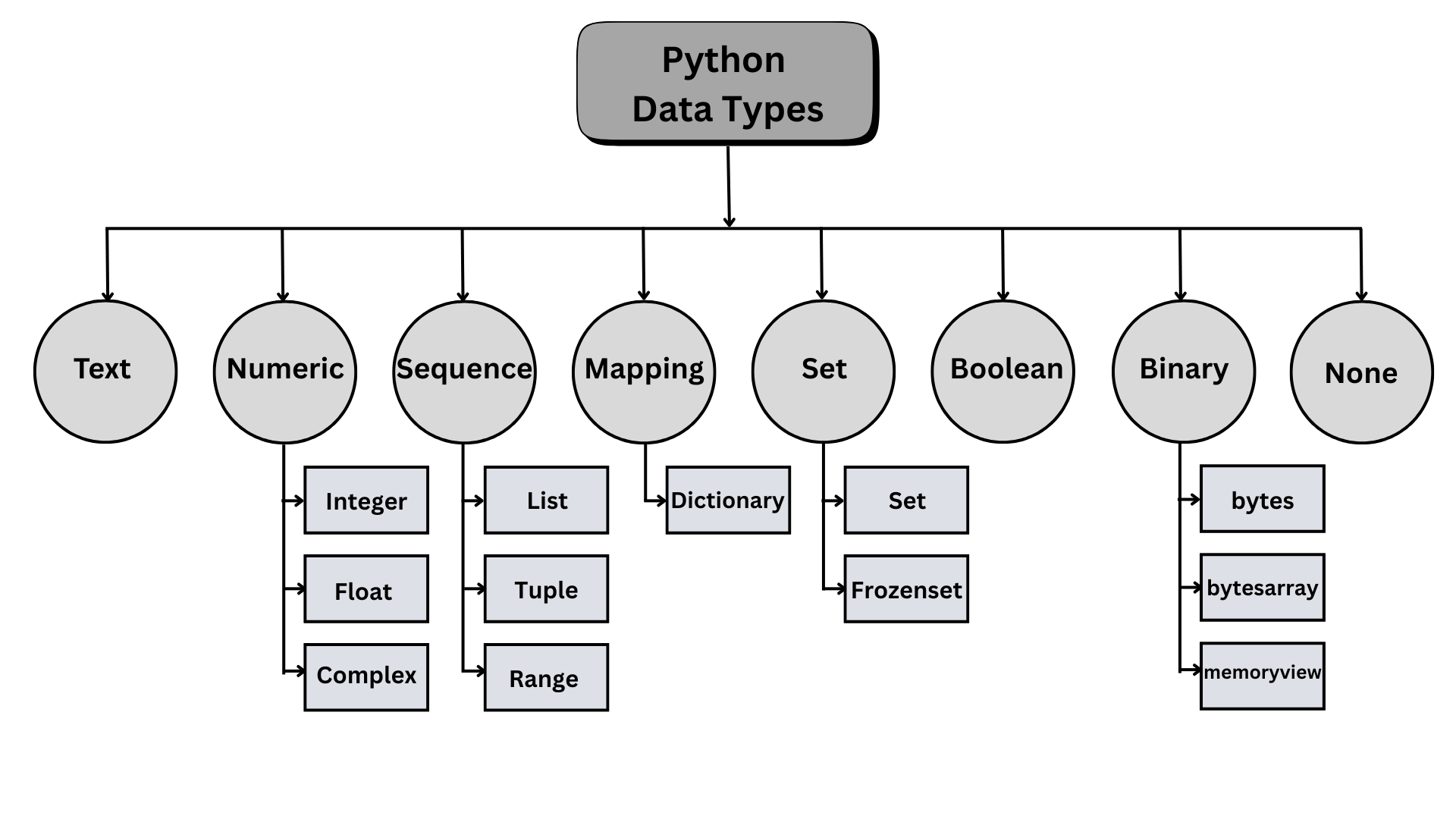
Fig. 2.1 Python built-in data types #
2.3.3. Type Hierarchy#
The standard type hierarchy in the Python Language Reference lists 8 different built-in data types with a slightly different categorization:
No. |
Category |
Type(s) |
Remarks |
|---|---|---|---|
1 |
Null |
|
|
2 |
NotImplemented |
|
|
3 |
Ellipsis |
|
|
4 |
Numeric |
integers ( |
Numbers for mathematical operations and Boolean ( |
5 |
Sequence |
|
immutable; ordered , indexed, and slicible collections of items; support slicing |
|
mutable; ordered, indexed, and slicible collections of items |
||
6 |
Set |
|
Unordered collections of unique items; |
7 |
Mapping |
|
Key-value pairs |
8 |
Callable |
User-defined functions |
|
Instance methods |
|||
Generator functions |
|||
Coroutine functions |
|||
Asynchronous generator functions |
|||
Built-in functions |
|||
Built-in methods |
|||
Classes |
|||
Class Instances |
2.3.4. Type Checking#
The built-in function type() returns the data type of the object; in this case, variables.
num1 = 10                   ### integer
num2 = 10.1                 ### floating-point number
greeting = "hello, world"   ### text/string
fruits = ['Apple', 'Banana', 'Cherry']      ### lists are enclosed with square brackets

print(type(num1))
print(type(num2))
print(type(greeting))
print(type(fruits))
<class 'int'>
<class 'float'>
<class 'str'>
<class 'list'>
2.3.5. Type Conversion#
Type conversion is the general process of converting a value from one data type to another. There are two ways of type conversion to change type:
Type Casting (explicit conversion) is performed by the programmer (e.g., using
int("42")) using the type constructors.Type Coercion (implicit conversion) is performed automatically by the Python interpreter (e.g.,
3 + 4.5results in7.5, where the integer3is coerced to a float to match the other operand).
2.3.5.1. Type Constructors#
Core Python types that are also constructor functions include:
Function |
Converts To |
Example |
Explanation |
|---|---|---|---|
|
Integer |
|
Converts string “10” to integer 10 |
|
Floating-point number |
|
Converts string “3.14” to floating-point 3.14 |
|
String |
|
Converts integer 25 to string “25” |
|
Boolean ( |
|
0 converts to False, non-zero values convert to True |
|
List |
|
Converts string into list of individual characters |
|
Tuple |
|
Converts list to immutable tuple |
|
Set |
|
Converts list to set, removing duplicate values |
As an example of type casting, let’s cast an integer to a float.
num = 1
print(num)
print(type(num))

num = float(num)
print(num)
print(type(num))
1
<class 'int'>
1.0
<class 'float'>
Type coercion is performed automatically by the Python interpreter at runtime. The Python interpreter decides the data type.
### type coercion

a = 7             # int
b = 3.0           # float
c = a + b         # Python automatically converts 'a' to a float (7.0) before addition
print(c)          # Output: 10.0
print(type(c))    # Output: <class 'float'>
10.0
<class 'float'>
Examples of type casting vs type coercion:
### type casting
num = 5
print("num's type:\t", type(num))
print("num's new type:\t", type(str(num)))  ### casting (explicit conversion) by programmer

### type coercion
x = 3               ### integer
y = 0.14            ### float
print(f"{x} + {y} is {x+y} and has the type: {type(x + y)}")
                    ### int + float = float done automatically by Python interpreter
                    ### coercion (implicit conversion)
num's type:	 <class 'int'>
num's new type:	 <class 'str'>
3 + 0.14 is 3.14 and has the type: <class 'float'>
### Exercise: Type Conversion
### Print the data type of variable 'num' after the addition
### The result should be as the cell below
### Your code begins here

num = "100.1"
num = float(num) + 1.0


### Your code ends here
<class 'float'>
2.3.6. Type Hinting#
Type hinting, also called type annotation, lets you write the expected type next to a variable name. A type hint is a note for humans and development tools; Python does not enforce it by itself when the program runs.
At this point, focus on the basic idea:
age: int = 20
name: str = "Alice"
height: float = 5.9
is_active: bool = True
The annotation after the colon says what kind of value the variable is expected to hold. Later, when we define our own functions, we will use the same notation for function parameters and return values:
def add(a: int, b: int) -> int:
    return a + b
For now, remember two rules:
type hints improve readability and help tools catch mistakes early;
type hints do not convert values or stop the program at runtime.
num: int = 10               ### type hinting for integer
name: str = "Alice"         ### type hinting for string
is_active: bool = True      ### type hinting for boolean
height: float = 5.9         ### type hinting for float