

9.1.1. String Creation and Accessing#
Strings are created through assignment operator using single, double, or triple quotes: ‘hello’, “hello”, “””hello”””.
The built-in Python function len() works with string as well.
import sys
from pathlib import Path

# Find project root by looking for _config.yml
current = Path.cwd()
for parent in [current, *current.parents]:
    if (parent / '_config.yml').exists():
        project_root = parent
        break
else:
    project_root = Path.cwd().parent.parent

# Add project root to path
sys.path.insert(0, str(project_root))

# Import shared teaching helpers and cell magics
from shared import thinkpython, diagram, jupyturtle, structshape
from shared.download import download
s = 'supercalifragilisticexpialidocious'

print(type(s))

n = len(s)
print(n)
<class 'str'>
34
Single and double quotes are interchangeable for single-line strings. Triple quotes are used for multi-line strings or strings that contain both single and double quotes.
s1 = 'Hello, world!'
s2 = "Hello, world!"
s3 = """This is
a multi-line
string."""

print(s1)
print(s2)
print(s3)
Hello, world!
Hello, world!
This is
a multi-line
string.
9.1.1.1. Escape Sequences and Raw Strings#
Inside a string, a backslash \ introduces an escape sequence — a two-character combination that represents a special character:
Escape Sequence |
Meaning |
Example output |
|---|---|---|
|
Newline |
moves to the next line |
|
Tab |
inserts a horizontal tab |
|
Backslash |
a literal |
|
Double quote |
|
|
Single quote |
|
A raw string is prefixed with r (or R) and treats backslashes as literal characters — no escape sequences are processed. Raw strings are especially useful for regular expression patterns and file paths.
print("line1\nline2")       # newline
print("col1\tcol2")         # tab
print("C:\\Users\\ty")      # literal backslashes
print(r"C:\Users\ty")       # raw string — same result, easier to read
line1
line2
col1	col2
C:\Users\ty
C:\Users\ty
### EXERCISE: Escape Sequences and Raw Strings
# Difficulty: Basic
# 1. Print two words on two lines using \n
# 2. Print two values separated by a tab using \t
# 3. Print a Windows path using a raw string
### Your code starts here:


### Your code ends here.
apple
banana
score	95
C:\Users\alice\data
9.1.1.2. Indexing and Slicing#
Strings are sequences, meaning each character has a numbered position called an index. Python uses zero-based indexing: the first character is at index 0, the second at index 1, and so on. Negative indices count from the end of the string.
9.1.1.2.1. String Indexing#
As a sequence type, the expression in brackets is an index, so called because it indicates which character in the sequence to select. String indexing is 0-based.
fruit = "banana"
print(fruit[0])
b
You can select a character from a string with the bracket operator.
s = 'Python'

print(s[0])    # 'P'  — first character
print(s[1])    # 'y'  — second character
print(s[-1])   # 'n'  — last character
print(s[-2])   # 'o'  — second to last
P
y
n
o
As a reminder, the last letter of a string is the length of the string minus 1. If you use len() to access the last element of the sequence you get an IndexError (string index out of range) because there is no element there to be accessed: 0-based indexing.
Also because of 0-based indexing, to get the last character, you have to subtract 1 from n (n-1).
fruit = 'banana'
n = len(fruit)
%%expect IndexError
fruit[n]
IndexError: string index out of range
fruit[n-1]
'a'
Often forgotten, there’s an easier way to access the last element of a sequence: negative indexing, which counts backward from the end. The index -1 selects the last letter, -2 selects the second to last, and so on.
fruit[-1]
'a'
The index in brackets can be a variable. Or an expression that contains variables and operators.
i = 1
print(fruit[i])
print(fruit[i+1])

for i in range(len(fruit)):
    print(fruit[i], end=' ')
a
n
b a n a n a
Just like lists and tuples, the value of the index has to be an integer – otherwise you get a TypeError.
%%expect TypeError
fruit[1.5]
TypeError: string indices must be integers, not 'float'
It is tempting to use the [] operator on the left side of an
assignment, with the intention of changing a character in a string.
The result is a TypeError. In the error message, the object is the string and the “item” is the character we tried to assign.
The reason for this error is that strings are immutable, which means you can’t change an existing string.
greeting = 'hello, world'
%%expect TypeError
greeting[0] = 'J'
TypeError: 'str' object does not support item assignment
The best you can do is create a new string that is a variation of the original.
new_greeting = 'J' + greeting[1:]     ### "+" is concatenate here
new_greeting
'Jello, world'
This example concatenates a new first letter onto a slice of greeting.
It has no effect on the original string.
greeting
'hello, world'
9.1.1.2.2. Slicing Strings#
Just like lists and tuples, a segment of a string is called a slice. Selecting a slice is similar to selecting a character. The general syntax of slicing is the same as lists and tuple:
sequence[start:stop:step]
Also, the parameters are start-inclusive and stop-exclusive.
start— index to begin at (inclusive, default0)stop— index to end at (exclusive, default end of string)step— how many characters to skip (default1)
fruit = 'banana'
fruit[0:3]
'ban'
The operator [m:n] returns the part of the string from the mth character to the nth character, including the first but excluding the second. This behavior is counterintuitive, but it might help to imagine the indices pointing between the characters, as in this figure:
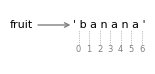
For example, the slice [3:6] selects the letters ana, which means that 6 is legal as part of a slice, but not legal as an index.
Also,
if you omit the first index, the slice starts at the beginning of the string.
if you omit the second index, the slice goes to the end of the string:
s = 'Hello, world!'

print(s[0:5])    # 'Hello'   — characters 0 through 4
print(s[7:])     # 'world!'  — from index 7 to end
print(s[:5])     # 'Hello'   — from start to index 4
print(s[::2])    # every other character
print(s[::-1])   ### 'reversed string' ###
Hello
world!
Hello
Hlo ol!
!dlrow ,olleH
If the first index is greater than or equal to the second, the result is an empty string, represented by two quotation marks. An empty string contains no characters and has length 0.
print(f"len(fruit[3:3]): {len(fruit[3:3])}")
print(f"Type of fruit[3:3]: {type(fruit[3:3])}")
fruit[3:3]
len(fruit[3:3]): 0
Type of fruit[3:3]: <class 'str'>
''
Continuing this example, what do you think fruit[:] means? Try it and
see.
fruit[:]
'banana'
To practice your slicing skills, play these in your head with string “banana”, which may not be as easy as you think.
fruit[0:-1]
fruit[-2:]
fruit[0:-1:2]

# print(fruit[0:-1])              ### all but the last letter: banan
# print(fruit[-2:])               ### the last two letters: na
# print(fruit[0:-1:2])            ### step is 2, so you get bnn
'bnn'
### EXERCISE: Indexing and Slicing
# Difficulty: Basic
text = 'superpython'
# 1. Print the first character
# 2. Print the last character using negative indexing
# 3. Print every second character
# 4. Print the reversed string
### Your code starts here:


### Your code ends here.
s
n
spryhn
nohtyprepus
9.1.1.3. Concatenation and Repetition#
The + operator joins two strings together (concatenation). The * operator repeats a string a given number of times (repetition).
first = 'Hello'
last  = 'World'

# Concatenation
greeting = first + ', ' + last + '!'
print(greeting)        # 'Hello, World!'

# Repetition
line = '* ' * 10
print(line)            # '* * * * * * * * * * '

print('ha' * 3)        # 'hahaha'
Hello, World!
* * * * * * * * * *
hahaha
### EXERCISE: Concatenation and Repetition
# Difficulty: Basic
first = 'Alice'
last = 'Bob'
# 1. Build and print: "Alice & Bob" using concatenation
# 2. Print "ha" repeated 4 times
# 3. Create a divider of 20 dashes and print it
### Your code starts here:


### Your code ends here.
Alice & Bob
hahahaha
--------------------