

6.5. Advanced List Concepts#
Understanding how Python manages list objects in memory is crucial for avoiding subtle bugs. This section explores object identity, aliasing, and how lists behave when passed to functions.
import sys
from pathlib import Path

# Find project root by looking for _config.yml
current = Path.cwd()
for parent in [current, *current.parents]:
    if (parent / '_config.yml').exists():
        project_root = parent
        break
else:
    project_root = Path.cwd().parent.parent

# Add project root to path
sys.path.insert(0, str(project_root))

# Import shared teaching helpers and cell magics
from shared import thinkpython, diagram, jupyturtle, structshape
from shared.download import download
6.5.1. Objects and Values#
If we run these assignment statements:
a = 'banana'
b = 'banana'
We know that a and b both refer to a string, but we don’t know whether they refer to the same string.
There are two possible states, shown in the following figure.
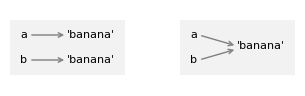
In the diagram on the left, a and b refer to two different objects that have the
same value. In the diagram on the right, they refer to the same object.
To check whether two variables refer to the same object, you can use the is operator.
a = 'banana'
b = 'banana'
a is b
True
In this example, Python only created one string object, and both a
and b refer to it.
But when you create two lists, you get two objects.
a = [1, 2, 3]
b = [1, 2, 3]
a is b
False
So the state diagram looks like this.
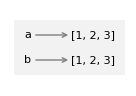
In this case we would say that the two lists are equivalent, because they have the same elements, but not identical, because they are not the same object. If two objects are identical, they are also equivalent, but if they are equivalent, they are not necessarily identical.
### EXERCISE: Objects and Values
x = [10, 20, 30]
y = x
z = [10, 20, 30]
# 1. Check if x and y refer to the same object using "is"
# 2. Check if x and z have the same value using "=="
# 3. Check if x and z refer to the same object using "is"
### Your code starts here:


### Your code ends here.
x is y: True
x == z: True
x is z: False
6.5.2. Aliasing#
If a refers to an object and you assign b = a, then both variables refer to the same object.
a = [1, 2, 3]
b = a
b is a
True
So the state diagram looks like this.
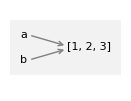
The association of a variable with an object is called a reference. In this example, there are two references to the same object.
An object with more than one reference has more than one name, so we say the object is aliased.
If the aliased object is mutable, changes made with one name affect the other.
In this example, if we change the object b refers to, we are also changing the object a refers to.
b[0] = 5
a
[5, 2, 3]
So we would say that a “sees” this change.
Although this behavior can be useful, it is error-prone.
In general, it is safer to avoid aliasing when you are working with mutable objects.
For immutable objects like strings, aliasing is not as much of a problem. In this example:
c = 'banana'
d = 'banana'
It almost never makes a difference whether a and b refer to the same
string or not.
### EXERCISE: Aliasing
a = [1, 2, 3]
# 1. Create an alias b that points to the same list as a
# 2. Modify the list through b by changing the first element to 99
# 3. Create a true copy c using slicing
# 4. Modify c and observe that a remains unchanged
### Your code starts here:


### Your code ends here.
a after aliasing: [99, 2, 3]
b: [99, 2, 3]
Same object? True

a after copying: [99, 2, 3]
c: [99, 777, 3]
Same object? False
6.5.3. List Arguments in Functions#
When you pass a list to a function, the function gets a reference to the
list. If the function modifies the list, the caller sees the change. For
example, pop_first uses the list method pop to remove the first element from a list.
def pop_first(lst):
    return lst.pop(0)
We can use it like this.
letters = ['a', 'b', 'c']
pop_first(letters)
'a'
The return value is the first element, which has been removed from the list – as we can see by displaying the modified list.
letters
['b', 'c']
In this example, the parameter lst and the variable letters are aliases for the same object, so the state diagram looks like this:
[np.float64(2.05), np.float64(1.22), np.float64(1.06), np.float64(0.85)]
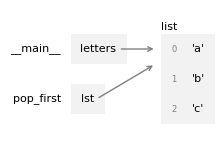
Passing a reference to an object as an argument to a function creates a form of aliasing. If the function modifies the object, those changes persist after the function is done.
### EXERCISE: List Arguments in Functions
def add_item(lst, item):
    """Add item to list and return the list"""
    lst.append(item)
    return lst

# 1. Create a list with [1, 2, 3], call it original
# 2. Call add_item with your list and the value 4,
#    save the result in a variable called updated
# 3. Print the original list to see if it changed after calling the function
# 4. check if original and updated refer to the same object using "is"
### Your code starts here:


### Your code ends here.
Original list: [1, 2, 3]
Returned list: [1, 2, 3, 4]
Original list after function call: [1, 2, 3, 4]
Same object? True
6.5.4. The all() and any() Functions#
Python provides two built-in functions for checking Boolean conditions across list elements:
all(iterable): ReturnsTrueif all elements are truthy (or if the list is empty)any(iterable): ReturnsTrueif at least one element is truthy
These are particularly useful when combined with list comprehensions or generator expressions.
# all() - check if all elements satisfy a condition
numbers = [2, 4, 6, 8, 10]

# Check if all numbers are even
all_even = all(num % 2 == 0 for num in numbers)
print(f"All numbers even? {all_even}")

# Check if all numbers are positive
all_positive = all(num > 0 for num in numbers)
print(f"All numbers positive? {all_positive}")

# With a list containing a negative number
mixed = [2, 4, -6, 8]
all_positive_mixed = all(num > 0 for num in mixed)
print(f"All mixed numbers positive? {all_positive_mixed}")
All numbers even? True
All numbers positive? True
All mixed numbers positive? False
# any() - check if at least one element satisfies a condition
numbers = [1, 3, 5, 7, 9]

# Check if any number is even
has_even = any(num % 2 == 0 for num in numbers)
print(f"Has any even number? {has_even}")

# Check if any number is greater than 5
has_large = any(num > 5 for num in numbers)
print(f"Has number > 5? {has_large}")

# Practical example: check if any word is longer than 10 characters
words = ['hello', 'world', 'programming', 'python']
has_long_word = any(len(word) > 10 for word in words)
print(f"Has word longer than 10 chars? {has_long_word}")
Has any even number? False
Has number > 5? True
Has word longer than 10 chars? True
Common use cases:
Validation:
all(score >= 60 for score in scores)- check if all students passedSearch:
any(word.startswith('py') for word in words)- check if any word starts with ‘py’Data quality:
all(value is not None for value in data)- check for missing data
Note: Both all() and any() use short-circuit evaluation—they stop as soon as the result is determined, making them efficient for large lists.
### EXERCISE: all() and any() Functions
numbers = [2, 4, 6, 8, 9]
words = ['python', 'java', 'javascript', 'go']
# 1. Check if all numbers are even using list comprehension (print)
# 2. Check if any word starts with 'j' using the
#    method ".startswith()" and list comprehension (print)
# 3. Check if any number is greater than 10 (print)
### Your code starts here:


### Your code ends here.
All numbers even: False
Any word starts with 'j': True
Any number > 10: False