

8.1. Dictionaries#
This chapter presents a built-in type called a dictionary.
It is one of Python’s best features – and the building block of many efficient and elegant algorithms.
8.1.1. What Is a Dictionary?#
A dictionary in Python is a built-in data type used to store data in key–value pairs. A Python dictionary is like a real world dictionary, where you look up a word for its definition. In Python dictionary, you look up a key for the value.
The key characteristics of a dictionary are:
Dictionaries are mutable (can be changed)
Keys must be immutable (strings, numbers, tuples)
A dictionary represents a mapping from keys to values.
Keys must be unique
Values can be any data type
In terms formatting,
Each dictionary item consists of a key and a value separated by a colon.
Dictionary items are separated by commas and enclosed in curly braces.
A dictionary is like a list, but more general. In a list, the indices have to be integers; in a dictionary they can be (almost) any type.
Feature |
List |
Dictionary |
|---|---|---|
Access by |
Index (0,1,2) |
Key |
Structure |
Ordered sequence |
Key-value mapping |
Best for |
Ordered data |
Labeled data |
As seen in the example below:
A list of number words can be accessed using an integer as an index.
A dictionary goes in the other direction, and look up a word to get the corresponding integer; in other words, using the keys to look up the values.
nums_lst = ['zero', 'one', 'two']
print(nums_lst)
print(nums_lst[1])

nums_dic = {'zero': 0, 'one': 1, 'two': 2}
print(nums_dic)
print(nums_dic['one'])
['zero', 'one', 'two']
one
{'zero': 0, 'one': 1, 'two': 2}
1
In mathematical language, a dictionary represents a mapping from keys to values, so you can also say that each key “maps to” a value. In this example, each number word maps to the corresponding integer.
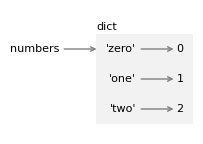
The following figure shows the state diagram for numbers.
A dictionary is represented by a box with the word “dict” outside and the items inside.
Each item is represented by a key and an arrow pointing to a value.
The quotation marks indicate that the keys here are strings, not variable names.
8.1.2. When to Use a Dictionary#
You use a dictionary when:
You need labeled data
You want fast lookups by name
You need a mapping relationship
Examples of dictionaries:
Student records
Configuration settings
Word counts
JSON data
8.1.3. Creating Dictionaries#
Python provides several ways to create a dictionary, depending on whether you already have the data or are building it incrementally. T
dict literal: the most common approach to create a dictionary
dict()constructor: to turn sequences into dictionariesdictionary comprehensions: are useful when keys and values come from other sources
Python also has a dict.fromkeys() method, which is a special case in creating dictionaries. Overall, common ways ways to create a dictionary include:
# |
Method |
Syntax |
Notes |
|---|---|---|---|
1 |
Empty dict literal |
|
Fastest way to create an empty dict |
2 |
Dict literal |
|
Keys and values known up front |
3 |
|
|
Keys must be valid identifiers |
4 |
From list of tuples |
|
Useful when pairs are already in a sequence |
5 |
|
|
All keys share the same default value |
6 |
Dict comprehension |
|
Build from any iterable with an expression |
Pay attention to ways 2, 3, and 4. We usually use dict literal for creating dictionaries but you should know how to use the dict() constructor to turn a sequence into a dictionary. Also, try to transfer your skill in list comprehension and tuple comprehension to dictionary comprehension.
# 1. Empty dict literal
d1 = {}

# 2. Dict literal with items
d2 = {'zero': 0, 'one': 1, 'two': 2}

# 3. dict() constructor with keyword arguments (keys must be valid identifiers)
d3 = dict(zero=0, one=1, two=2)

# 4. dict() from a list of (key, value) tuples
d4 = dict([('zero', 0), ('one', 1), ('two', 2)])

# 5. dict.fromkeys() — all keys share the same default value
d5 = dict.fromkeys(['zero', 'one', 'two'], 0)

# 6. Dict comprehension
words = ['zero', 'one', 'two']
d6 = {word: idx for idx, word in enumerate(words)} # note the two variables

print("Empty literal:       ", d1)
print("Dict literal:        ", d2)
print("dict() keywords:     ", d3)
print("dict() from tuples:  ", d4)
print("dict.fromkeys():     ", d5)
print("Dict comprehension:  ", d6)
Empty literal:        {}
Dict literal:         {'zero': 0, 'one': 1, 'two': 2}
dict() keywords:      {'zero': 0, 'one': 1, 'two': 2}
dict() from tuples:   {'zero': 0, 'one': 1, 'two': 2}
dict.fromkeys():      {'zero': 0, 'one': 0, 'two': 0}
Dict comprehension:   {'zero': 0, 'one': 1, 'two': 2}
To give some details about dictionary creation, let’s use the dictionary literal to create a dictionary, which is to put the items inside curly braces.
numbers = {'zero': 0, 'one': 1, 'two': 2}
Each item consists of a key and a value separated by a colon. The items are separated by commas and enclosed in curly braces.
Another way to create a dictionary is to use the dict function.
We can make an empty dictionary like this.
empty = dict()
empty
{}
Or, if you have a list like [ “zero”, “one”, “two”], you can use enumerate() to create a dictionary.
lst = ["zero", "one", "two "]

dict_words = {}
for idx, word in enumerate(lst):
    dict_words[word] = idx

print(dict_words)
{'zero': 0, 'one': 1, 'two ': 2}
And we can make a copy of a dictionary like this.
numbers_copy = dict(numbers)
numbers_copy
{'zero': 0, 'one': 1, 'two': 2}
It is often useful to make a copy before performing operations that modify dictionaries.