

4.3. Recursion#
It is legal for a function to call itself. It may not be obvious why that is a good thing, but it turns out to be one of the most magical things a program can do. Here’s an example.
import sys
from pathlib import Path

# Find project root by looking for _config.yml
current = Path.cwd()
for parent in [current, *current.parents]:
    if (parent / '_config.yml').exists():
        project_root = parent
        break
else:
    project_root = Path.cwd().parent.parent

# Add project root to path
sys.path.insert(0, str(project_root))

# Import shared teaching helpers and cell magics
from shared import thinkpython, diagram, jupyturtle, structshape
from shared.download import download
def countdown(n):
    if n <= 0:
        print('Blastoff!')
    else:
        print(n)
        countdown(n-1)
If n is 0 or negative, countdown outputs the word, “Blastoff!” Otherwise, it
outputs n and then calls itself, passing n-1 as an argument.
Here’s what happens when we call this function with the argument 3.
countdown(3)
3
2
1
Blastoff!
The execution of countdown begins with n=3, and since n is greater
than 0, it displays 3, and then calls itself…
The execution of
countdownbegins withn=2, and sincenis greater than0, it displays2, and then calls itself…The execution of
countdownbegins withn=1, and sincenis greater than0, it displays1, and then calls itself…The execution of
countdownbegins withn=0, and sincenis not greater than0, it displays “Blastoff!” and returns.The
countdownthat gotn=1returns.The
countdownthat gotn=2returns.
The countdown that got n=3 returns.
A function that calls itself is recursive.
As another example, we can write a function that prints a string n times.
def print_n_times(string, n):
    if n > 0:
        print(string)
        print_n_times(string, n-1)
If n is positive, print_n_times displays the value of string and then calls itself, passing along string and n-1 as arguments.
If n is 0 or negative, the condition is false and print_n_times does nothing.
Here’s how it works.
print_n_times('Spam ', 4)
Spam
Spam
Spam
Spam
For simple examples like this, it is probably easier to use a for
loop. But we will see examples later that are hard to write with a for
loop and easy to write with recursion, so it is good to start early.
4.3.1. Stack diagrams for recursive functions#
Here’s a stack diagram that shows the frames created when we called countdown with n = 3.
from shared.diagram import make_frame, Stack

frames = []
for n in [3,2,1,0]:
    d = dict(n=n)
    frame = make_frame(d, name='countdown', dy=-0.3, loc='left')
    frames.append(frame)

stack = Stack(frames, dy=-0.5)
from shared.diagram import diagram, adjust


width, height, x, y = [1.74, 2.04, 1.05, 1.77]
ax = diagram(width, height)
bbox = stack.draw(ax, x, y)
# adjust(x, y, bbox)
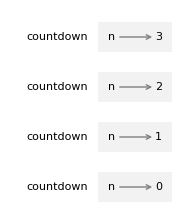
The four countdown frames have different values for the parameter n.
The bottom of the stack, where n=0, is called the base case.
It does not make a recursive call, so there are no more frames.
from shared.diagram import make_frame, Stack
from shared.diagram import diagram, adjust

frames = []
for n in [2,1,0]:
    d = dict(string='Hello', n=n)
    frame = make_frame(d, name='print_n_times', dx=1.3, loc='left')
    frames.append(frame)

stack = Stack(frames, dy=-0.5)

width, height, x, y = [3.53, 1.54, 1.54, 1.27]
ax = diagram(width, height)
bbox = stack.draw(ax, x, y)
# adjust(x, y, bbox)
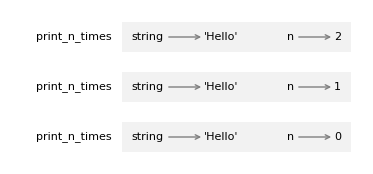
4.3.2. Infinite recursion#
If a recursion never reaches a base case, it goes on making recursive calls forever, and the program never terminates. This is known as infinite recursion, and it is generally not a good idea. Here’s a minimal function with an infinite recursion.
def recurse():
    recurse()
Every time recurse is called, it calls itself, which creates another frame.
In Python, there is a limit to the number of frames that can be on the stack at the same time.
If a program exceeds the limit, it causes a runtime error.
%xmode Context
Exception reporting mode: Context
try:
    recurse()
except RecursionError as error:
    print(type(error).__name__)
RecursionError
The traceback indicates that there were almost 3000 frames on the stack when the error occurred.
If you encounter an infinite recursion by accident, review your function to confirm that there is a base case that does not make a recursive call. And if there is a base case, check whether you are guaranteed to reach it.
4.3.3. Recursion with return values#
Now that we can write functions with return values, we can write recursive functions with return values, and with that capability, we have passed an important threshold – the subset of Python we have is now Turing complete, which means that we can perform any computation that can be described by an algorithm.
To demonstrate recursion with return values, we’ll evaluate a few recursively defined mathematical functions. A recursive definition is similar to a circular definition, in the sense that the definition refers to the thing being defined. A truly circular definition is not very useful:
vorpal: An adjective used to describe something that is vorpal.
If you saw that definition in the dictionary, you might be annoyed. On the other hand, if you looked up the definition of the factorial function, denoted with the symbol \(!\), you might get something like this:
This definition says that the factorial of \(0\) is \(1\), and the factorial of any other value, \(n\), is \(n\) multiplied by the factorial of \(n-1\).

Fig. 4.1 Fibonacci Sequence#
If you can write a recursive definition of something, you can write a Python program to evaluate it.
Following an incremental development process, we’ll start with a function that take n as a parameter and always returns 0.
def factorial(n):
    return 0
Now let’s add the first part of the definition – if the argument happens to be 0, all we have to do is return 1:
def factorial(n):
    if n == 0:
        return 1
    else:
        return 0
Now let’s fill in the second part – if n is not 0, we have to make a recursive
call to find the factorial of n-1 and then multiply the result by n:
def factorial(n):
    if n == 0:
        return 1
    else:
        recurse = factorial(n-1)
        return n * recurse
The flow of execution for this program is similar to the flow of countdown in Chapter 5.
If we call factorial with the value 3:
Since 3 is not 0, we take the second branch and calculate the factorial
of n-1…
Since
2is not0, we take the second branch and calculate the factorial ofn-1…Since
1is not0, we take the second branch and calculate the factorial ofn-1…Since
0equals0, we take the first branch and return1without making any more recursive calls.The return value,
1, is multiplied byn, which is1, and the result is returned.The return value,
1, is multiplied byn, which is2, and the result is returned.
The return value 2 is multiplied by n, which is 3, and the result,
6, becomes the return value of the function call that started the whole
process.
The following figure shows the stack diagram for this sequence of function calls.
from shared.diagram import Frame, Stack, make_binding

main = Frame([], name='__main__', loc='left')
frames = [main]

ns = 3, 2, 1
recurses = 2, 1, 1
results = 6, 2, 1

for n, recurse, result in zip(ns, recurses, results):
    binding1 = make_binding('n', n)
    binding2 = make_binding('recurse', recurse)
    frame = Frame([binding1, binding2],
                  name='factorial', value=result,
                  loc='left', dx=1.2)
    frames.append(frame)

binding1 = make_binding('n', 0)
frame = Frame([binding1], name='factorial', value=1,
              shim=1.2, loc='left', dx=1.4)
frames.append(frame)

stack = Stack(frames, dy=-0.45)
from shared.diagram import diagram, adjust

width, height, x, y = [2.74, 2.26, 0.73, 2.05]
ax = diagram(width, height)
bbox = stack.draw(ax, x, y)
# adjust(x, y, bbox)
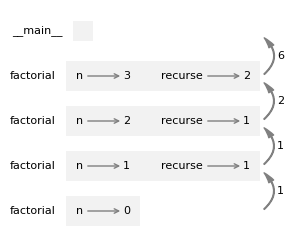
The return values are shown being passed back up the stack.
In each frame, the return value is the product of n and recurse.
In the last frame, the local variable recurse does not exist because the branch that creates it does not run.
4.3.4. Fibonacci#
After factorial, the most common example of a recursive function is fibonacci, which has the following definition:
Translated into Python, it looks like this:
def fibonacci(n):
    if n == 0:
        return 0
    elif  n == 1:
        return 1
    else:
        return fibonacci(n-1) + fibonacci(n-2)
If you try to follow the flow of execution here, even for small values of \(n\), your head explodes.
But according to the leap of faith, if you assume that the two recursive calls work correctly, you can be confident that the last return statement is correct.
As an aside, this way of computing Fibonacci numbers is very inefficient. In the algorithms chapter I’ll explain why and suggest a way to improve it.