6. Lists#
This chapter presents one of Python’s most useful built-in types, lists. You will also learn more about objects and what can happen when multiple variables refer to the same object.
Learning Objectives
By the end of this chapter, you should be able to:
Construct and manipulate Python lists using indexing, slicing (including advanced step slices), and core list methods.
Explain and reason about object identity, aliasing, shallow vs. deep copies, and how lists behave when passed to functions.
Use lists idiomatically in Python: list comprehensions, unpacking and starred expressions,
enumerate(),zip(), and basic sorting/looping patterns.
Introduction to Lists
What is a List?
If you’re familiar with other programming languages, Python lists are similar to arrays in languages like Java, C++, or JavaScript. However, Python lists are more flexible: they can grow or shrink dynamically and can contain mixed data types.
A Python list is a sequence data type, like strings and tuples. Sequences are:
ordered collections that support
indexing,
slicing,
len(),inmembership testing, anditeration.
The key distinction is mutability and heterogeneous element data types:
In a string, the values are characters; in a list, they can be any type. The value literals in a list are called elements.
Lists are mutable, meaning they can be modified after creation.
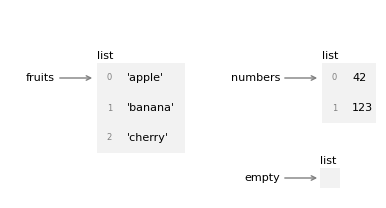
The following figure shows the state diagram for fruits, numbers and empty. Lists are objects in Python’s memory. When you create a list, Python creates a list object that holds your data in a specific order, and the variable holds a reference to that object.
numbers = [42, 123]
fruits = ['apple', 'banana', 'cherry']
empty = []