

2.3.7. Python Built-in Functions#
In Python, built-in functions and built-in modules are both part of the standard tools the language gives you, but they serve different purposes. Built-in functions are ready to use without requiring any imports. They are automatically available in every Python program. Modules, on the other hand, need to be imported to use. For the functionalities that Python does not provide, we either
Find a third-party package (module or library) with the functions, install the package, and use the contained functions, or
Write a user-defined custom function.
import sys
from pathlib import Path

# Find project root by looking for _config.yml
current = Path.cwd()
for parent in [current, *current.parents]:
    if (parent / '_config.yml').exists():
        project_root = parent
        break
else:
    project_root = Path.cwd().parent.parent

# Add project root to path
sys.path.insert(0, str(project_root))

# Import shared teaching helpers and cell magics
from shared import thinkpython, diagram, jupyturtle, structshape
from shared.download import download
Built-in vs custom functions: Python ships with functions like print() and len(), and you can also create your own custom functions.
Python built-in functions are tools for quick operations (such as length, conversion, and output). A few of them that you will use constantly:
print("Hello!")              # Output to screen

len_num = len([1, 2, 3])     # 3: len() get the length of the argument
num = int("42")              # 42 (string → int); int() is a type constructor
sum_num = sum([1, 2, 3])     # 6 (sum a list sequence)
max_num = max(5, 2, 9)       # 9

print(len_num)
print(num)
print(sum_num)
print(max_num)
Hello!
3
42
6
9
In the Python Standard Library , you can find all the Python built-in functions listed:
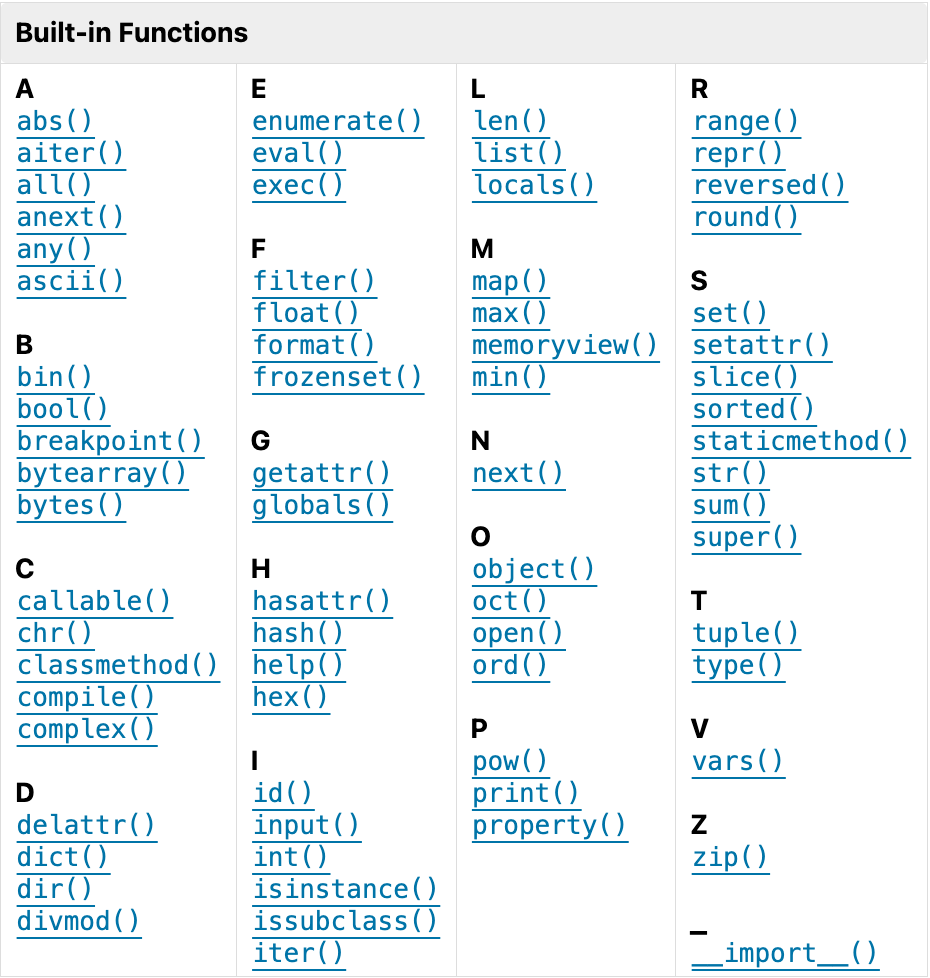
Fig. 2.2 Python Built-In Functions #
We may group the 71 built-in functions by their purposes.
Group |
Functions |
Notes |
|---|---|---|
Numbers & math |
|
|
Type construction/conversion |
|
Convert or construct core types. |
Object/attribute introspection |
|
|
Attribute access |
|
Dynamic attribute management. |
Iteration & functional tools |
|
Prefer comprehensions when clearer. |
Sequence/char helpers |
|
|
I/O |
|
|
Formatting / representation |
|
Also see f-strings for formatting. |
Object model (OOP helpers) |
|
Define descriptors and class behaviors. |
Execution / metaprogramming |
|
Use with care; security concerns for untrusted input. |
Environment / namespaces |
|
Introspection of current namespaces. |
Help/debugging |
|
|
Import |
|
Low-level import; usually use |
But Python has more than the built-in functions listed above. Let’s look at arithmetic/math functions as an example. You see that Python provides three groups of arithmetic functions:
built-in functions (the 7 functions as listed in the table above)
operatormodule functionsmathmodule functions
For the operator module, there are math functions to perform the same operations as the arithmetic operators, which you will need to perform operations such map and reduce:
import operator
operator.add(3, 2)       # 5
operator.sub(3, 2)       # 1
1
The math module functions do better with high-level arithmetic, as shown below. These functions are self-explanatory.
import math
Function |
Purpose |
Example |
||
|---|---|---|---|---|
|
Square root |
|
→ |
|
|
Factorial |
|
→ |
|
|
Round up |
|
→ |
|
|
Round down |
|
→ |
|
|
Multiply all items |
|
→ |
|
|
Absolute (always float) |
|
→ |
|
|
Finite number? |
|
→ |
|
2.3.7.1. Arguments#
When you call a function, the expression in parentheses is called an argument. For example:
int('101')           ### take one argument
math.pow(5, 2)       ### take two
int('101', 2)        ### take additional optional arguments, such as base 2 here
round(math.pi, 3)    ### takes an optional second argument, **decimal places**
print('Any', 'number', 'of', 'arguments')   ### multiple arguments
Any number of arguments
2.3.7.2. Return Values#
When you call built-in functions such as abs, round, sqrt, and pow, they return a value you can assign to a variable or use as part of an expression.
Some use the print function to display values, but they don’t return values we assign to variables or use in expressions.
import math

math.sqrt(42 / math.pi)            ### returns value
3.656366395715726
radius = math.sqrt(42 / math.pi)    ### assign to variable
radius
3.656366395715726
If a function doesn’t have a return statement, it returns None, which is a special value like True and False.
You have used the print function to display a string, but it does not use a return statement to return a value. If we assign the result to a variable, it still displays the string.
print(print()) ### returns None
None